Generating descriptions using AI
Use Pimics AI to generate draft product descriptions from item data, feature values, and optional pictures. This capability helps speed up content creation, but users should always review and finalize generated text before publication.
Before you begin
Before generating descriptions with AI, make sure that:
- The Pimics AI extension is available in your environment.
- The item exists and contains enough product context, such as item data, features, or source descriptions.
- Description classes are set up for the content types you want to generate.
Generate text for an item
Use this process to generate or improve a product description with Pimics AI from the item card.
- Choose the search icon (Alt+Q), enter PIM Items, then choose the related link.
- Open the item you want to edit.
- Go to the Descriptions tab on the PIM Item Card.
- Select the description class you want to generate or update.
- Select Generate.
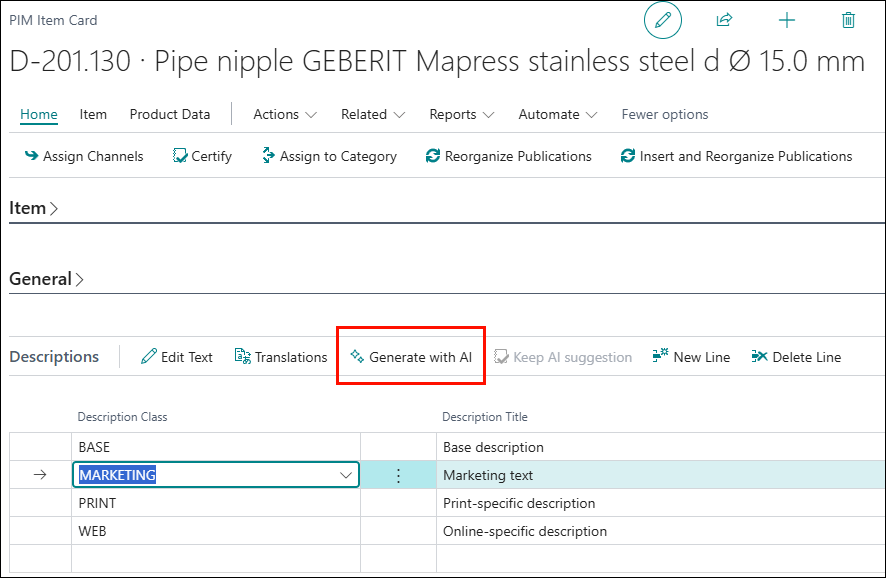
- In the generation window, configure the parameters for the current description.
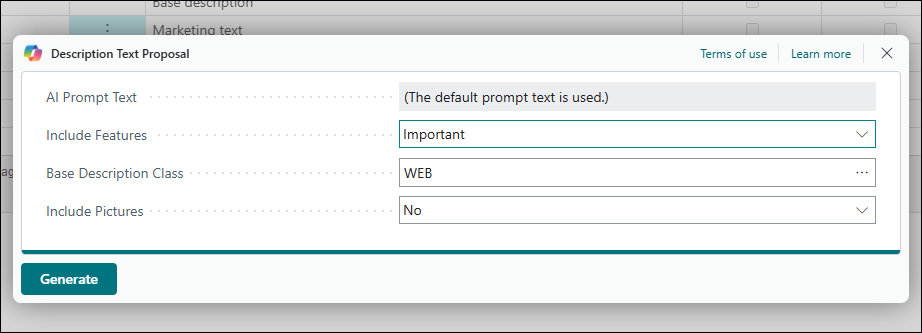
- AI Prompt Text can be defined individually for each description class in Description Classes.
- Include Features controls whether AI uses product features in the generated text.
- Base Description Class allows you to select a description class as additional context for generation.
- Include Pictures allows you to send the current item pictures to the AI for analysis in generating the current description text.
- After generation, review the output and choose one of the following actions: Keep it, Regenerate, or Discard.
Note
Generated text is a draft. Validate facts, tone, and compliance requirements before you publish.
Generate descriptions in bulk
While generating a description for a single item works as described in Generate text for an item, Pimics also supports triggering AI description generation for multiple items at once. This is useful when working with large portions of the catalog, where opening each item individually would not be practical.
Bulk generation follows the same logic as single-item generation. The AI uses the configured prompt, item features, and any selected base description class to produce output. The difference is scope: the process runs at item group, product group, or chapter level instead of on a single item.
Customized prompts
Use this process to customize AI prompts per description class.
- Choose the search icon (Alt+Q), enter Description Classes, then choose the related link.
- Select the description class line you want to customize.
- In the AI Prompt Text field, type your customized prompt.
- Changes are saved automatically.
Examples
- A MARKETING prompt might instruct the AI to write two to three sentences in a customer-friendly tone, highlighting the main product benefit.
- An SEO prompt might instruct the AI to write a concise, search-friendly description that includes the primary keyword naturally in the first sentence, uses one or two supporting terms, and avoids keyword stuffing.
- A MANUFACTURER prompt might request neutral, factual wording focused on brand and supplier-related information.